
- uv builds a global, fast dependency cache.
- Pex bundles Python apps into executables.
- Grog adds caching and parallelism for sub second build times.
If you are reading this, you have likely been tasked with shoveling an AI-powered avalanche of tangled Python code into production. But because you are a good engineer, you put it in a monorepo so you can run extensive, integrated checks across everything that ships. The catch is that in Python (and especially in polyglot repos), there just isn’t a lot of support for this setup. You are forced to either write a lot of glue code or buy into a heavyweight monorepo build tool.
In this post, I will show you how at Visia we built a blazingly fast (benchmark) cross-platform build and test pipeline using uv, pex, and Grog:
- uv is a lightning-fast package manager for Python.
- pex is a tool for generating single file executables from your Python apps. More on this later.
- grog is a lightweight (one might say grug-brained) monorepo build tool that makes it easy and performant to glue together build scripts. Disclaimer: I am the author of Grog.
In particular, we will be discussing a new technique for wiring the uv cache into pex’s dependency resolution. Then, we will go over how you can use Grog to scale your monorepo builds with caching and parallelization.
Don’t want to read? You can check out the full example code at github.com/chrismatix/uv-pex-monorepo.
Why this is hard
When you have a single Python app, life is simple: You just COPY *.py . all of your Python files into your Docker image, install your dependencies, and you are pretty much done. But consider this super-minimal toy example of a monorepo where two apps cli/ and server/ have a shared dependency on lib/format:
lib/
└── format/
├── src/
└── pyproject.toml
server/
├── src/
├── Dockerfile
└── pyproject.toml
cli/
├── src/
├── Dockerfile
└── pyproject.toml
pyproject.toml
uv.lock
How do you build server/Dockerfile to ensure that it has all the code that you need?
There are two naive approaches that sort of work for some time:
- Give Docker access to
lib/formatusing--build-context. - Have a single Dockerfile at the root and mount directories using build args.
Both of these approaches have very obvious flaws when it comes to performance and complexity. Honorable mentions are adopting Pants and hand-rolling a build system with your own scripts, neither of which are lean enough for startups and small teams (more on that later). On top of that, Pants uses pex under the hood anyway, so even if you opt for Pants, understanding the approach I am outlining will be helpful to you.
What we need is something that allows us to bundle our Python code the way you can do with webpack in Node.js or the way that you compile your Rust/Go/etc. code into binary executables. This process should be fast and must also allow us to target different architectures and operating systems.
UV ❤️ PEX
First up, if you are not yet using uv to manage your Python dependencies and virtual environments, tab out of this post right now and fix that. Not only is uv easily the fastest way to install your Python dependencies, it also allows you to maintain a global lock file for your monorepo and comes with excellent documentation and credible momentum.
Pex (Python Executable) is a tool and format for bundling your Python apps in a single executable zip file (or directory). The value for a monorepo is obvious: Rather than collecting and copying all your files into a Docker image, you copy a single executable pex. Up until a few weeks ago, this process was workable but slow because pex was using pip for fetching third-party packages (see my previous blog post on this). To address this and support uv, the maintainer of pex recently added the option to resolve dependencies from a virtual environment.
So we can first create a virtual environment from uv and then provide it to pex as a repository for third-party packages. Here is an example script of how we might build our server/ app:
# 1. Lock the workspace dependencies
uv pip compile pyproject.toml -q --format pylock.toml -o build/pylock.toml

# 2. Build a .whl from the current package
uv build --wheel --out-dir ./build

# 3. Install all first and third party deps into a venv
uv venv --clear build/install.venv

# 4. Build a requirements.txt for pex to use
uv --color=never -q pip list \
  --python build/install.venv \
  --format freeze \
  > build/requirements.all.txt

# 5. Build the pex
uvx pex \
  --include-tools \
  --project=build/server-0.1.0-py3-none-any.whl \\
  --requirements=build/requirements.all.txt \\
  --venv-repository build/install.venv/ \\
  -o dist/bin.pex
Quite a lot of steps! But if you stick around, we will go over how it can be neatly wrapped up in a build system.
Let’s look at what this gives us:
We now have a bin.pex file that we can directly run from the command line.
It’s not quite portable yet, since it will only work on our machine type and requires the correct Python version to be installed.
While you can bundle Python with your pex file by passing --scie eager we have found this to be slower for Docker images than using the system Python.
We can build for a different os/architecture by forcing uv to only fetch package wheels for the correct platform tag:
Say that we want to build a pex that can run on linux/amd64 from our Mac.
All we need to do is pass the --python-platform=x86_64-manylinux2014 flag to the uv pip compile and the uv pip install commands.
Check out the uv docs for a full list of supported platform tags.
Next, we want to embed our pex file in a Docker image. While you could just copy the file into the image and be done, there are a few optimizations that I have included in this snippet:
FROM python:3.12-slim as builder

# Copy the pex file and create the virtual environment
COPY ./dist/bin.pex /bin.pex
RUN PEX_TOOLS=1 /usr/local/bin/python3.12 /bin.pex venv --compile /app

# Final image
FROM python:3.12-slim

# Copy the app from the builder stage
COPY --from=builder /app /app

ENTRYPOINT ["/app/pex"]
This converts the pex into a regular virtualenv and pre-compiles the Python cache files to speed up startup and make the file paths more debuggable.
How fast is it?
On my MacBook Pro M3, the above script takes about 4.6 seconds with clean uv caches to build the cli app.
I have added a mirror of this approach to the pants/ directory in the demo repository for this blog post.
Pants is a good baseline for our setup because, for Python, it’s much more “ergonomic” than Bazel, and its pex builds offer a good comparison.
On a cold start with clean caches, Pants takes about 10.9 seconds.
Even though this is a trivial example, that’s a pretty good result!
This, however, is a very deceptive comparison because the point of Pants, Bazel, and other mono-repo build tools is that they make heavy use of caching. Optimally, execution time should take a fraction of a second if nothing has changed. But these tools have a very steep learning curve and force you to replace your entire toolchain with their way of doing things. I have led adoption efforts of both Bazel and Pants, and in both cases, we ended up with one or two developers becoming a hyper-specialized bottleneck for writing build code. So how do you scale this type of build without locking yourself into a huge technical commitment?
Scaling with Grog
If you stopped the article right here, you would already have a powerful blueprint for building an in-house Python CI. But as the number of your apps and packages grows, you will notice that it becomes increasingly hard to keep your builds fast and reliable. So we reach for the two most common ideas in optimization: caching and parallelization. The fastest build is the one that you never have to run because your inputs have not changed. And if you have to run a build, you should use every CPU core.
While there are many established tools that do this well, they also require a massive complexity tax, one that is usually too high to pay for small to medium teams. This tax is not a bug, but a consequence of what makes them good: Pants, Bazel, etc. run your builds in a fully isolated sandbox to improve reproducibility and isolation. This in turn means most regular dev tooling does not work out of the box, and instead you need to use their built-in abstractions that hide a lot of the details. The guarantees that you get from this hermiticity are extremely important for repositories with millions of lines of code such as the ones at Google, Meta, and other large IT operations. But what if you don’t need all this complexity but still want to reap the benefits of cached parallel runs?
This is where Grog comes in.
Grog lets you wrap your build shell scripts with simple, declarative BUILD files - think Makefiles on crack.
These BUILD files define build targets.
Each target has file inputs, a build command, and outputs that Grog will cache for you.
A target can also depend on other targets via dependencies.
You can read more about build configuration here. BUILD files can be written in JSON, YAML, using Makefile comments, or pkl, which is a powerful, dynamic configuration language by Apple. For our purposes, in particular, we want to use pkl so that we can re-use our tricky uv/pex build.
This is what a BUILD.pkl file for the server app looks like:
amends "@grog/package.pkl"
import ".../lib/grog/python.pkl"
local sources = List(
"server/**/*.py",
"pyproject.toml"
)
local deps = List(
"//lib/format",
"//lib/proto"
)
targets {
...new python.PythonPexImage {
deploy_arch = "amd64"
name = "server"
app_sources {
...sources
}
app_dependencies {
...deps
}
}.targets
new {
name = "test"
command = "uv run pytest"
inputs {
...sources
"tests/*.py"
}
dependencies {
...deps
}
}
}
Without going into too many of the details, you can, at a glance, quickly get what is going on here.
python.PythonPexImage is a custom template for generating build targets (source code).
There is also a test target, and all of them depend on the //lib/format and //lib/proto libraries.
We can see all the build targets for our server app by running grog ls:
❯ grog ls //...
//:uv.lock
//cli:image
//cli:package
//cli:pex
//cli:pylock
//lib/format:format
//lib/format:test
//lib/proto:proto
//server:image
//server:package
//server:pex
//server:pylock
//server:test
All the targets in the cli and server apps (:image, :package, :pex, and :pylock) are generated by the python.PythonPexImage template.
We can also inspect the actual build graph with grog graph:
❯ grog graph
//cli:image
╰── //cli:pex
├── //cli:package
├── //cli:pylock
│ ╰── //:uv.lock
╰── //lib/format:format
//lib/format:test
╰── //lib/format:format
//server:image
╰── //server:pex
├── //lib/format:format
├── //lib/proto:proto
├── //server:package
╰── //server:pylock
╰── //:uv.lock
//server:test
├── //lib/format:format
╰── //lib/proto:proto
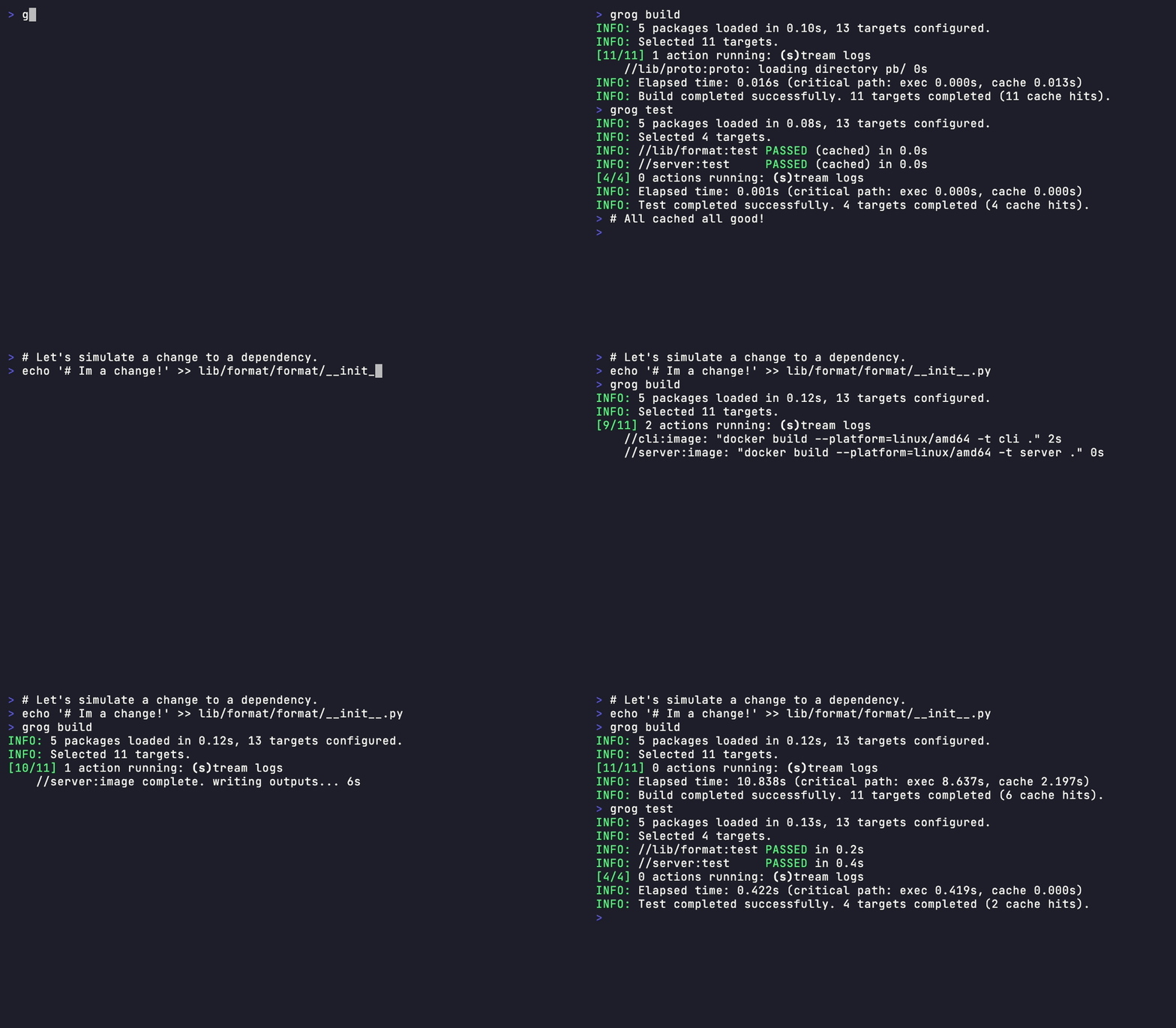
And now we can build our entire project with grog build and running it again will cache the result!
Further, if we make a change to one of the dependencies, Grog will only rebuild downstream changes:
But how does this stack up against Pants?
Benchmark time!
You can find the benchmark script producing these numbers here.
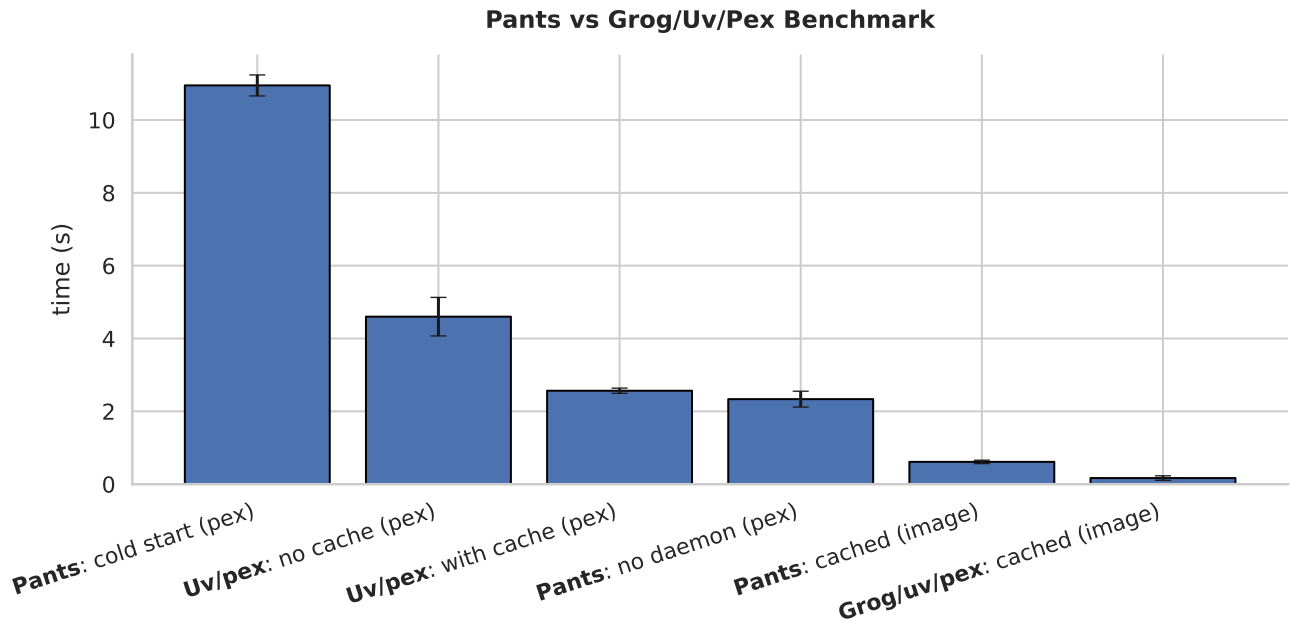
Again, we can see that our uv/pex approach is significantly faster on a complete cold start with no caches. Since most of this time is spent on the network, the edge is likely due to uv’s performance as a package manager. In a more realistic scenario where both Grog and Pants get to use their caches we can see that Grog is just a bit faster. Pants also gets an extra performance boost from having a daemon process running in the background and hogging about 300 MB of memory (because it’s written in Python). This saves Pants both the expensive cold-start tax and allows it to watch for file changes, which is a requirement in huge repositories. This feature is on Grog’s roadmap as well.
But execution speed is not everything! Adopting a build tool in a week rather than months is a small fortune nowadays, even in small teams. Even more so when everyone feels comfortable making changes, because, under the hood, it’s all just shell scripts! At Visia, we tried migrating to Pants but quickly realized that it was just too complicated for our scale. Then we adopted Grog in a week and cut our build time by 50% while keeping everyone productive.
So yes: Pex builds powered by uv and Grog are among the fastest Python monorepo CIs that you can find online right now. But if you have the hermicity requirements and resources that come with a large organization, you might still be better off with Bazel or Pants.
If you enjoyed this post, consider: